WebP · HEIC · AVIF to JPG or PNG Images that won't open, made plain.
Browsers save WebP, iPhones shoot HEIC, newer sites serve AVIF, and the program you need the picture in wants a plain JPG or PNG. PlainJPG converts them on your Windows PC, by the folder, keeping camera info and dates. Nothing is uploaded.
Free for 25 images · then $15, once · Windows 10 & 11, x64 and ARM64

Every file these apps and devices hand you
- Chrome, Edge, Firefox.webp→ .jpg
- iPhone & iPad photos.heic→ .jpg
- News & shopping sites.avif→ .jpg
- Downloads foldersmixed→ one batch
- Android & Samsung.heic / .avif→ .jpg
- Transparent graphics.webp / .avif→ .png
Why the picture won't open
Newer formats, older programs.
WebP, HEIC and AVIF pack photos tighter than JPG, so browsers, phones and websites switched to them. The programs you actually paste pictures into mostly did not: older Photoshop, Office, print shops, forums, CRMs and the 2014 photo frame still want a plain JPG or PNG.
- 01
Your browser saves WebP
Right-click, Save image, and Chrome, Edge or Firefox hands you a .webp even when the page showed a JPG. Years of collected reference images end up unusable in most software.
- 02
Your iPhone shoots HEIC
Every photo since iOS 11 is .heic. Copy them to a Windows PC and Photos may show them, but the form, the editor or the client's upload box refuses them. Converting 1,000 holiday photos one by one is not a plan.
- 03
Websites serve AVIF
News sites, shops and CDNs now deliver .avif, the newest and smallest of the three. Almost nothing outside a browser opens it yet.
Privacy 100%
Your photos never leave your PC.
Online converters want your file first: upload, wait, download it back, hit the daily limit, and hope they deleted their copy. PlainJPG is a Windows app. No cloud, no upload, no account, no file-count limit. It makes no network requests of its own.
- Family photos, client work, ID scans, anything private stays on your drive.
- No size or count limits: a folder of 5,000 HEIC photos is one batch.
- No account, no email, no analytics, no telemetry inside the app.
| Online converters | PlainJPG | |
|---|---|---|
| Your photo goes to a server | Every time | Never |
| Daily file limits | Usually | None |
| Whole folders, subfolders | One by one | Yes |
| Keeps EXIF, GPS, dates | Rarely | Yes |
| Works offline | No | Yes |
Where does your photo go?
 PlainJPG
Plain JPG
PlainJPG
Plain JPG
How it works
Drop. Pick JPG or PNG. Done.
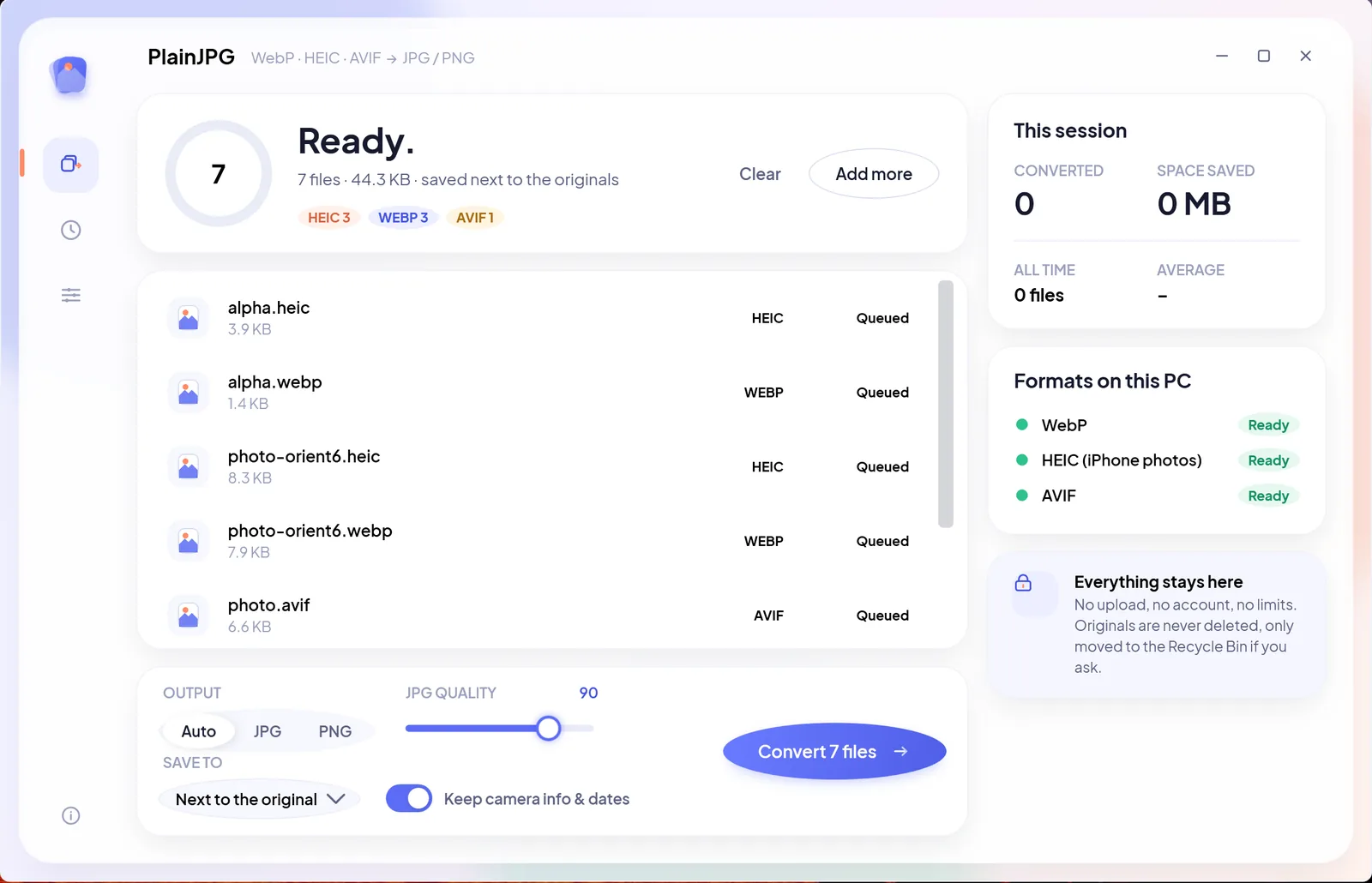
One window, one job. Drop single files or whole folders, choose the output, click Convert. Or skip the window: right-click any WebP, HEIC or AVIF in File Explorer and choose Convert to JPG with PlainJPG.
- 1
Drop files or folders
WebP, HEIC, HEIF and AVIF, mixed freely. Folders are scanned with their subfolders; everything else in them is ignored.
- 2
Pick the output
Auto writes PNG only when an image has transparency and JPG otherwise. Or force JPG (with a quality slider) or PNG for every file.
- 3
Choose where it goes
Next to the original, into one folder of your choice, or replace the original. Replaced files go to the Recycle Bin, never straight to deletion.
- 4
Convert, in parallel
Every CPU core works on its own file. Each result shows its new name and size, and the History panel remembers where everything was saved.
What survives the trip
Only the format changes.
Most converters hand back a bare file: no date taken, no camera, no location, and your photos stop sorting by date. PlainJPG copies the EXIF and XMP metadata into the JPG or PNG, resets the orientation tag so the picture is upright everywhere, and copies the file's own created and modified dates.
Sharing publicly and would rather not keep the location? Switch Keep camera info off and the copy carries no metadata at all.
IMG_2041.heic → IMG_2041.jpg7 to check- Date taken2026-07-14 18:42:07EXIFKept
- Camera and lensApple iPhone 15 Pro · 24 mm ƒ/1.78EXIFKept
- LocationGPS latitude, longitude, altitudeEXIFKept
- OrientationRotated 90° on the phoneTag 6Upright
- XMP and editsRatings, keywords, edit historyXMPKept
- File datesCreated and modifiedOriginalKept
- Pixels4032 × 3024, full qualityHEICJPG 92
Converters
Three formats in, two formats out.
Each format has its own quirks, so each has its own guide. HEIC and AVIF are decoded by Microsoft's codec extensions; if one is missing, PlainJPG shows a one-click link to get it from the Store.
- WEBPJPGPNG
WebP to JPG or PNG
Every image a browser saved. Transparent WebP becomes PNG automatically. No codec needed.
WebP to JPG guide → - HEICJPGPNG
HEIC to JPG or PNG
iPhone and iPad photos, a whole camera roll at once, with date taken, GPS and orientation kept.
HEIC to JPG guide → - AVIFJPGPNG
AVIF to JPG or PNG
The newest web format, saved from news and shopping sites, turned into files every app opens.
AVIF to JPG guide →
Pricing
$15. Once.
Yours forever.
Try it free on 25 images. Then one payment for a licence key that works on 2 PCs, with every update free. No subscription, no account, no upsell.
- Every feature: single files, whole folders, Explorer right-click
- WebP, HEIC, HEIF and AVIF in; JPG and PNG out; any size, any count
- Free updates, forever. 14-day refund, no questions.
 Microsoft Store listing: in certification, coming soon.
If SmartScreen says “Windows protected your PC”, click More info → Run anyway: the installer is new and not yet code-signed. Verify the download against its SHA-256 checksum.
HEIC needs Microsoft's free HEIF Image Extensions plus HEVC Video Extensions (free from your PC maker or $0.99 on the Store); AVIF needs the free AV1 Video Extension. PlainJPG links to each one when it is missing. WebP needs nothing.
FAQ
Questions, answered.
How do I convert WebP to JPG on Windows?
Install PlainJPG, drop the WebP files or the folder they are in onto the window, choose JPG (or leave Auto, which picks PNG only for transparent images) and click Convert. The JPG copies land next to the originals with the same names. You can also right-click a .webp in File Explorer and choose Convert to JPG with PlainJPG. Details on the WebP to JPG page.
How do I open HEIC photos on Windows and convert them to JPG?
Windows decodes HEIC through Microsoft's HEIF Image Extensions and HEVC Video Extensions. PlainJPG checks for both on launch and links to the Microsoft Store if one is missing. Once they are there, drop the photos or a whole folder and it writes JPGs that keep the date taken, camera, GPS and orientation. Step by step on the HEIC to JPG page.
Does PlainJPG keep EXIF data, GPS and the date taken?
Yes. EXIF and XMP metadata (date taken, camera and lens, GPS location, orientation) are written into the JPG or PNG, and the file's own created and modified dates are copied too, so your photos still sort the way they did. Switch Keep camera info off if you would rather share a file with no metadata.
Can I convert a whole folder of images at once?
Yes. Drop one folder or several and PlainJPG converts every WebP, HEIC, HEIF and AVIF in them, subfolders included, using all CPU cores. There is no file count or file size limit, in the trial or after.
Are my photos uploaded anywhere?
No. PlainJPG runs entirely on your PC and makes no network requests of its own. It has no account, no analytics and no telemetry. The only link it opens is to the Microsoft Store page of a codec, and only when you click it. The privacy policy is short because there is nothing to disclose.
How much does PlainJPG cost?
The download is free and converts 25 images as a trial, every feature included. A licence is $15 once, for 2 PCs, with free updates. On the Microsoft Store it is a one-time purchase of $14.99 with no trial, handled by Microsoft.
Which Windows versions and PCs does it run on?
Windows 10 version 2004 (build 19041) or later and Windows 11, on x64 and ARM64 PCs such as Surface and Snapdragon laptops. The installer carries both builds and installs the one that matches. A Mac version is planned.
JPG or PNG: which should I pick?
JPG for photos: much smaller files, opens everywhere, and at quality 92 (the default) the difference from the original is invisible. PNG for images with transparency or sharp graphics and text, because JPG has no transparency and softens hard edges. Auto decides per image: PNG when any pixel is transparent, JPG otherwise.
Why is the JPG sometimes larger than the WebP or HEIC?
Because WebP, HEIC and AVIF are newer and pack pixels tighter than JPG; that is why browsers and phones adopted them. A somewhat larger JPG is normal and the pixels are the same. Lower the quality slider if size matters more than the last bit of detail.
What happens to my original files?
By default nothing: the copy is written next to the original, or into the folder you chose. If you pick Replace the original, the original goes to the Recycle Bin after the copy is written and checked, so it can always be restored.