
- PlainJPG
- HEIC to JPG or PNG
Converter for Windows 10 & 11HEIC to JPG, a whole camera roll at once.
PlainJPG converts HEIC and HEIF photos from an iPhone, iPad or Android phone into plain JPG (or PNG) on your Windows PC, by the folder. Date taken, camera, GPS and orientation are kept. Nothing is uploaded.
Free for 25 photos · then $15, once · uses Microsoft's HEIF and HEVC codecs
Why iPhone photos won't open on a Windows PC
Every iPhone since iOS 11 shoots HEIC by default: half the size of a JPG at the same quality, which is why Apple chose it. The image inside is compressed with the HEVC video codec, and Windows does not ship an HEVC decoder. So the photos copy over fine and then Photos shows a broken thumbnail, Paint refuses, the client portal's upload box says "unsupported file type", and the older Photoshop or Office at work has no idea what a .heic is.
Two things fix it. Microsoft's HEIF Image Extensions and HEVC Video Extensions teach Windows to decode HEIC, which makes the photos viewable in Photos and a few other apps. Converting to JPG makes them usable everywhere, forever, including on PCs and sites you do not control. PlainJPG does the second, using the first.
How to convert HEIC to JPG on Windows with PlainJPG
- Install PlainJPG (free download, Windows 10 and 11, x64 and ARM64).
- Install the codecs, once. PlainJPG checks on launch and shows a one-click link to the Microsoft Store for anything missing: HEIF Image Extensions (free) and HEVC Video Extensions ($0.99, or the free "from Device Manufacturer" edition on many PCs). Every app on the PC benefits.
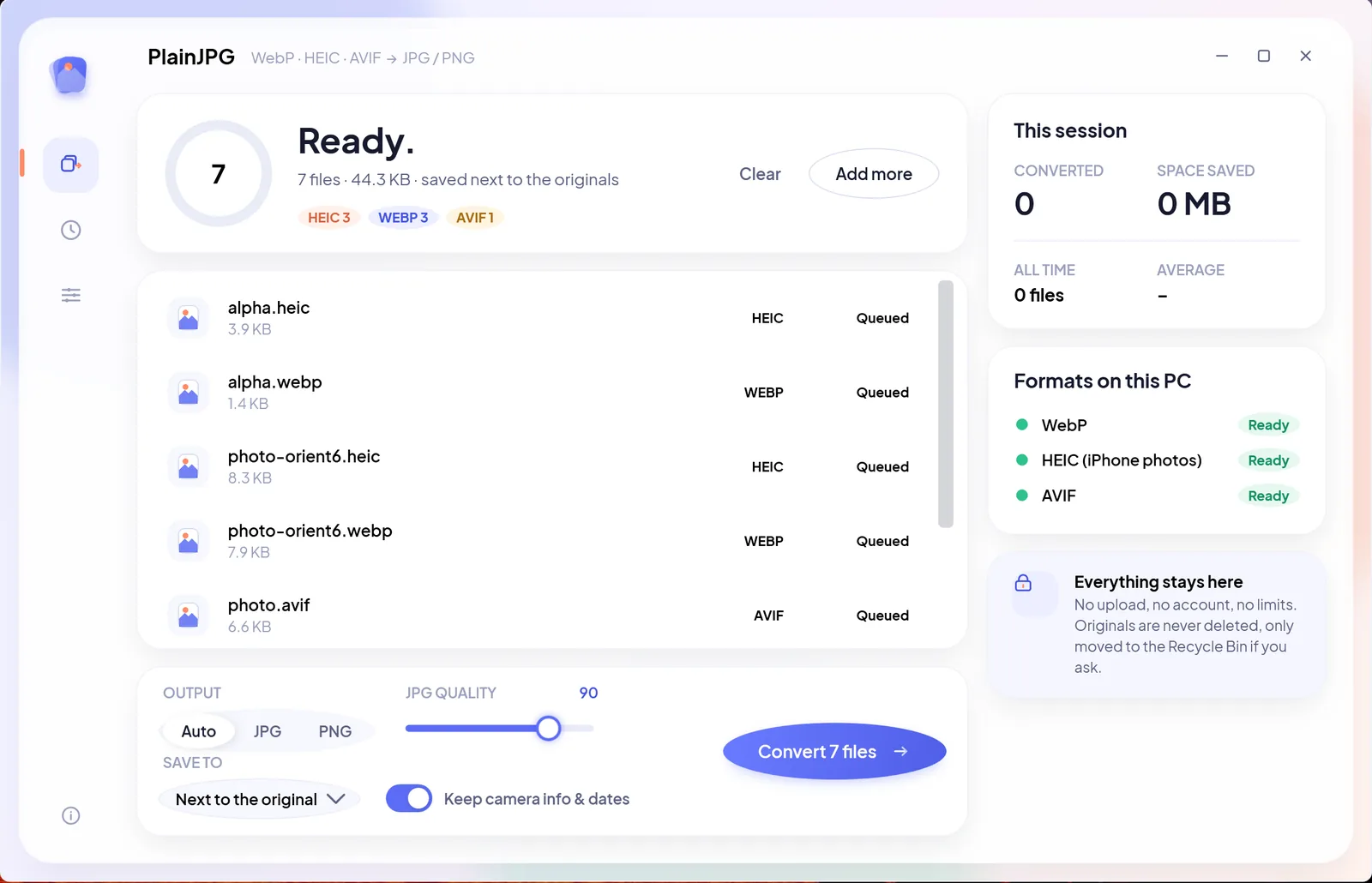
- Drop the photos or the whole folder on the window, or right-click a
.heicin File Explorer and choose Convert to JPG with PlainJPG. Subfolders are included, so a copied camera roll sorted by month is one drop. - Pick JPG (quality 92 by default, or move the slider), PNG, or Auto.
- Choose where the JPGs go (next to the originals, one folder, or replace the originals via the Recycle Bin) and click Convert. All CPU cores work at once; a thousand photos take minutes, not an afternoon.
What the JPG keeps from the HEIC
- Date taken, camera and lens, GPS location: the EXIF block is copied into the JPG, so Lightroom, Google Photos, Windows Photos and any gallery still sort and map the photos correctly.
- Orientation: phones store many photos sideways with a rotation tag. PlainJPG writes the picture upright and resets the tag, so it is never shown rotated by a program that ignores tags.
- XMP: ratings, keywords and edit history survive.
- File dates: created and modified dates are copied, so a folder of converted photos still lines up with the originals.
- Full resolution: no resizing, no watermark. The JPG is a bit larger than the HEIC, which is normal: HEIC packs tighter, that is the whole point of it.
The built-in ways, and where they stop
| Method | Good for | The catch |
|---|---|---|
| iPhone: Settings → Camera → Formats → Most Compatible | Shooting JPG from now on | Larger photos on the phone; does nothing for the HEICs you already have |
| iPhone: Settings → Photos → Transfer to Mac or PC → Automatic | Copying over USB | Only on cable transfer; iCloud, AirDrop-to-PC tools and SD cards still deliver HEIC |
| Windows Photos or Paint, Save as | One photo | Needs the same codecs; one file at a time; dates and often EXIF are lost |
| Online HEIC converters | A few photos | Your photos, with their GPS data, are uploaded; daily limits; EXIF usually stripped |
| PlainJPG | Any number of photos and folders, offline | $15 once after a 25-photo trial; needs the Microsoft codecs |
HEIC to JPG questions
How do I convert HEIC to JPG on Windows 11?
Install the HEIF and HEVC extensions from the Microsoft Store (PlainJPG links to both when they are missing), then drop the photos or their folder on PlainJPG, set the output to JPG and click Convert. Each photo becomes a JPG with the same name that keeps its date taken, camera, GPS and orientation.
Why won't my HEIC photos open on Windows?
HEIC stores the image with the HEVC video codec, which Windows does not decode out of the box. Without the extensions, Photos, Paint and most other programs cannot read the file, and many programs never open HEIC even with the codecs installed. Converting to JPG solves both.
Is the HEVC extension free?
The HEIF Image Extensions are free. HEVC Video Extensions cost $0.99 on the Store; a free "from Device Manufacturer" edition exists on many PCs. Either is installed once and used by every app, including PlainJPG.
Does converting HEIC to JPG keep the date taken and location?
Yes: EXIF and XMP metadata including date taken, camera, lens and GPS are written into the JPG, orientation is corrected, and the file's dates are copied. Switch Keep camera info off to strip the metadata instead.
Can I convert 1,000 HEIC photos at once?
Yes. Drop the folder and PlainJPG converts every HEIC in it and its subfolders in one batch using all CPU cores, with no file count or size limit.
How do I stop my iPhone from taking HEIC photos?
On the iPhone open Settings → Camera → Formats and choose Most Compatible to shoot JPG from now on, or Settings → Photos → Transfer to Mac or PC → Automatic to convert while copying over USB. Neither changes the HEIC photos you already have; PlainJPG converts those.

The whole camera roll, as JPG, with its dates.
Download PlainJPG for WindowsAlso converts WebP to JPG and AVIF to JPG.